Open topic with navigation
Frequently Asked Questions
Using the Software with the M9384B VXG
1. How do I configure Pulse Building to run on the VXG?
2. What signal does Pulse Building control when running on a VXG with option 002 (Two RF signals)?
3. How do I change the signal Pulse Building is controlling?
4. How do I get two instances of Pulse Building running on the VXG to control both signal 1 and signal 2?
5. What is the shortest scenario that can be generated?
6. If I reduce the sample rate is the scenario period reduced?
7. What is the timing resolution between pulses?
8. What is the smallest pulse width I can generate with the VXG?
9. What is the maximum scenario time supported by the VXG?
10. What is maximum VXG Arb memory?
11. What is the best way to configure the Pulse Building scenario for the VXG?
12. How do I synchronize two signals?
13. What is the maximum pattern name I can use with the VXG?
14. Where are Pulse Building scenarios installed on the VXG?
15. What is the Pulse Building naming convention?
16. Which file do I select to get my scenario to play?
17. What should I do if I get an out of Arb Memory error?
18. How does Pulse Building configure the VXG ALC?
19. Can I change signal settings in the VXG from Pulse Building without recomputing a waveform?
20. Why doesn’t Pulse Building provide a flatness correction measurement with the VXG?
1. How do I configure Pulse Building to run on the VXG?
Just install in the default directory on the VXG signal generator.
Access the application from the VXG Signal block.
Or access from the Windows Start Menu under Keysight Signal Studio.
Administrator privilege required to install Pulse Building.
2. What signal does Pulse Building control when running on a VXG with option 002 (Two RF signals)?
When starting from the VXG Signal block, Pulse Building is configured for that signal.
When Starting from the Windows Start menu, Pulse Building is configured for signal 1.
When Starting from the VXG Signal block only a single instance of Pulse Building is started. If you go to the other signal block and start Pulse Building it just brings the existing Pulse Building display to the top. Pulse Building is still controlling the other signal.
Pulse Building indicates the signal it is controlling in the status bar.

3. How do I change the signal Pulse Building is controlling?
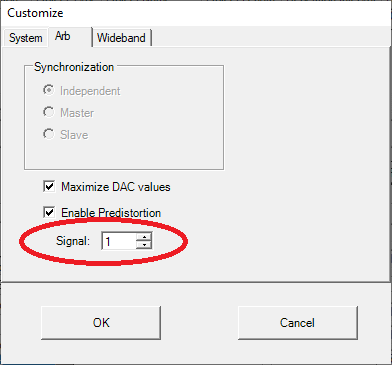
The active signal is changed under the Pulse Building menu item Download-> Customize…-> Arb.
4. How do I get two instances of Pulse Building running on the VXG to control both signal 1 and signal 2?
From VXG Signal 2 block Launch Pulse Building. This instance controls signal 2.
From Windows Start Menu start Pulse Building. This instance controls signal 1.
You can always change signal each Pulse Building instance is controlling.
Two instances controlling the same signal is probably not a good idea.
5. What is the shortest scenario that can be generated?
The shortest scenario that can be created for the VXG is 4 us.
This is derived from the minimum waveform size used in a sequence that is guaranteed to not underflow at the maximum sample rate.
4us = (10240 samples / 2560 M samples per second)
The scenario can contain 1 or more pulses in the 4 us. To generate a PRI of 100 ns would require 40 pulses.
6. If I reduce the sample rate is the scenario period reduced?
No. The minimum scenario period remains at 4 us. The minimum waveform size is reduced keeping the (sample/sample rate) ratio fairly constant.
7. What is the timing resolution between pulses?
The timing resolution between pulses is 1/(sample rate).
309.625 ps for the maximum sample rate 2.56 G Samples/s
The total scenario period is an integer multiple of (32 samples / sample rate).
This is accomplished by padding the last pulse with zeros if necessary.
The minimum scenario of 4 us uses 10240 samples which is divisible by 32 without remainder.
8. What is the smallest pulse width I can generate with the VXG?
Pulse Building allows the user to specify a pulse width that only requires a single sample, 390.635 ps at the 2.56 GHz sample rate.
However, The VXG baseband signal processing bandwidth is limited to about 2 GHz.
This means at best it can pass a pulse width of about ½ ns. This requires at least two samples in the waveform.
The 0.5 ns pulse width is achievable only using IQ modulation. The RF pulse modulator must be disabled.
Adding rise and fall times of a few ns can reduce the overshoot and ringing of the pulse.
The RF pulse modulator has nominal rise and fall times of about 7 ns.
This means that at best it could be possible to generate a pulse width of 7 ns at the 3 dB point with the pulse modulator.
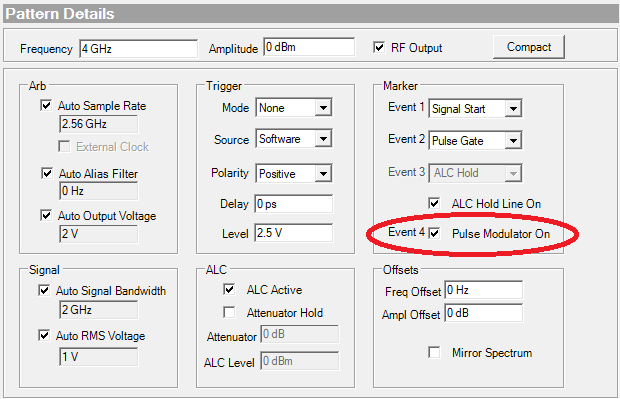
Pulse Building uses waveform marker 4 to drive the pulse modulator. This can be disabled for very narrow pulse generation (IQ only).
Pulse Building insures marker 4 turns on the pulse modulator at least 7 ns before the IQ pulse and remains on until 7 ns after the IQ turns off.
Pulse Building default is to use the RF pulse modulator with the IQ data to achieve the highest pulse On/Off ratio.
9. What is the maximum scenario time supported by the VXG?
The maximum scenario is determined by the amount of Arb memory in the VXG, the maximum number of packets in the sequence and in some cases by the Pulse Building internal structure.
A scenario is composed of a waveform file and a sequence file.
These two files share the Arb memory when the sequence is playing.
A waveform sample use 5 bytes 2 for I data, 2 for Q data and 1 byte for marker data.
A sequence packet (the part of the waveform to play and how many times) takes 11 bytes.
Pulse Building typically uses 2 packets per pulse.
Pulse Building supports 4 M packets with the VXG.
So in general that’s 2 million pulses.
If the average PRI is 100 us then the scenario period would be 200 seconds.
This period assumes that the unique pulses (IQ & marker data) didn’t exceed the Arb memory.
See the Pulse Building help “About Pulse Building - > Signal Limits” for a complete discussion of this topic.
Pulse building does not use the VXG nested sequence capability.
10. What is maximum VXG Arb memory?
The VXG Arb memory is shared by waveforms and sequences.
Standard 256 M Samples (256000000 * 5 bytes per sample)
Option M05 512 M Samples (512000000 * 5 bytes per sample)
Option M10 1024 M Samples (1024000000 * 5 bytes per sample)
11. What is the best way to configure the Pulse Building scenario for the VXG?
Typically do a new pattern and use those settings. If desired disable the Auto sample rate and enter the desired sample rate.
Reducing the sample rate can conserve waveform memory in some cases but also reduces the signal bandwidth.
12. How do I synchronize two signals?
Pulse Building doesn’t directly support signal synchronization. It may disrupt synchronization when downloading scenarios.
Use Pulse Building to generate the desired scenarios for each signal then synchronize directly from the VXG front panel.
13. What is the maximum pattern name I can use with the VXG?
Pulse Building supports pattern names of up to 20 characters in length.
14. Where are Pulse Building scenarios installed on the VXG?
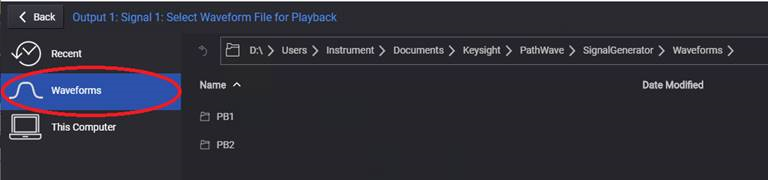
Pulse Building scenarios (composed of a waveform and a sequence file) are placed in non-volatile memory under
Waveforms\PB1 for signal 1
Waveforms\PB2 for signal 2
15. What is the Pulse Building naming convention?
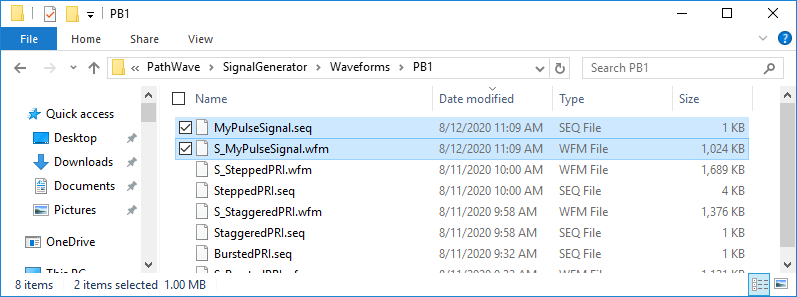
A Pulse Building pattern named “MyPulseSignal” creates two files:
a sequence “MyPulseSignal.seq” file
a waveform “S_MyPulseSignal.wfm” file.
16. Which file do I select to get my scenario to play?
Always select the sequence file to get the correct RF signal out.
Selecting a waveform file with “S_” at the beginning will play a list of pulses without correct timing between them.
17. What should I do if I get an out of Arb Memory error?
Pulse Building can load multiple scenarios in Arb Memory. This makes it faster to select and play different scenarios.
The VXG Arb memory can become full after repeated downloads.
Use the Pulse Building Clear Arb Memory command under the Download menu item to free memory.
Or, from the Signal block's Waveform Playback Setup properties, click Select and then click Clear Arb Memory.
18. How does Pulse Building configure the VXG ALC?
Pulse Building sets the VXG ALC Auto mode to on when the PB ALC Enable setting is on.
Pulse Building does not directly turn the ALC on.
Pulse Building disables the VXG ALC when the PB ALC Enable setting is off.
Pulse Building disables the ALC when a pattern has an antenna scan applied.
19. Can I change signal settings in the VXG from Pulse Building without recomputing a waveform?
Yes, change the desired settings on the Pulse Building “Advanced” panel and just press play.
This will update frequency, amplitude, and some of the advanced settings.
Typically settings that control the baseband signal accuracy (Sample Rate, RMS voltage, …) require a download and play to update.
This because the waveform must be recalculated.
All setting can be changed from the VXG front panel if desired.
20. Why doesn’t Pulse Building provide a flatness correction measurement with the VXG?
The VXG has an internal flatness correction to the VXG RF output.
It also provides a user flatness correction to the users desired reference plane.
The VXG applies these corrections to the Pulse Building waveform.
The corrections are updated by the VXG automatically when the frequency or other settings are changed.
The VXG provided corrections are much more efficient than using the Pulse Building corrections.
Pulse Building corrections require that a Signal Analyzer be connected to the users reference plane.
Each time an RF setting is changed a new measurement must be made to correct the Pulse Building waveform.
Pulse Building enables the VXG flatness correction by default.